Tailored CRM · Concept demonstration
A sales system shaped around the real path to delivery.
This fictional B2B CRM connects lead qualification, solution design, quotations, approval rules, follow-ups, account history, and delivery handoff instead of forcing every opportunity through a generic pipeline.
Interactive experience
Work through the commercial system.
Concept demonstration built by Pixelity using fictional organizations, people, values, and activity. Nothing shown is a live system or client project.
Tailored CRMFictional demonstration
2pending alertsSDSales DirectorFictional user
Pipeline
Revenue workflow
Pipeline
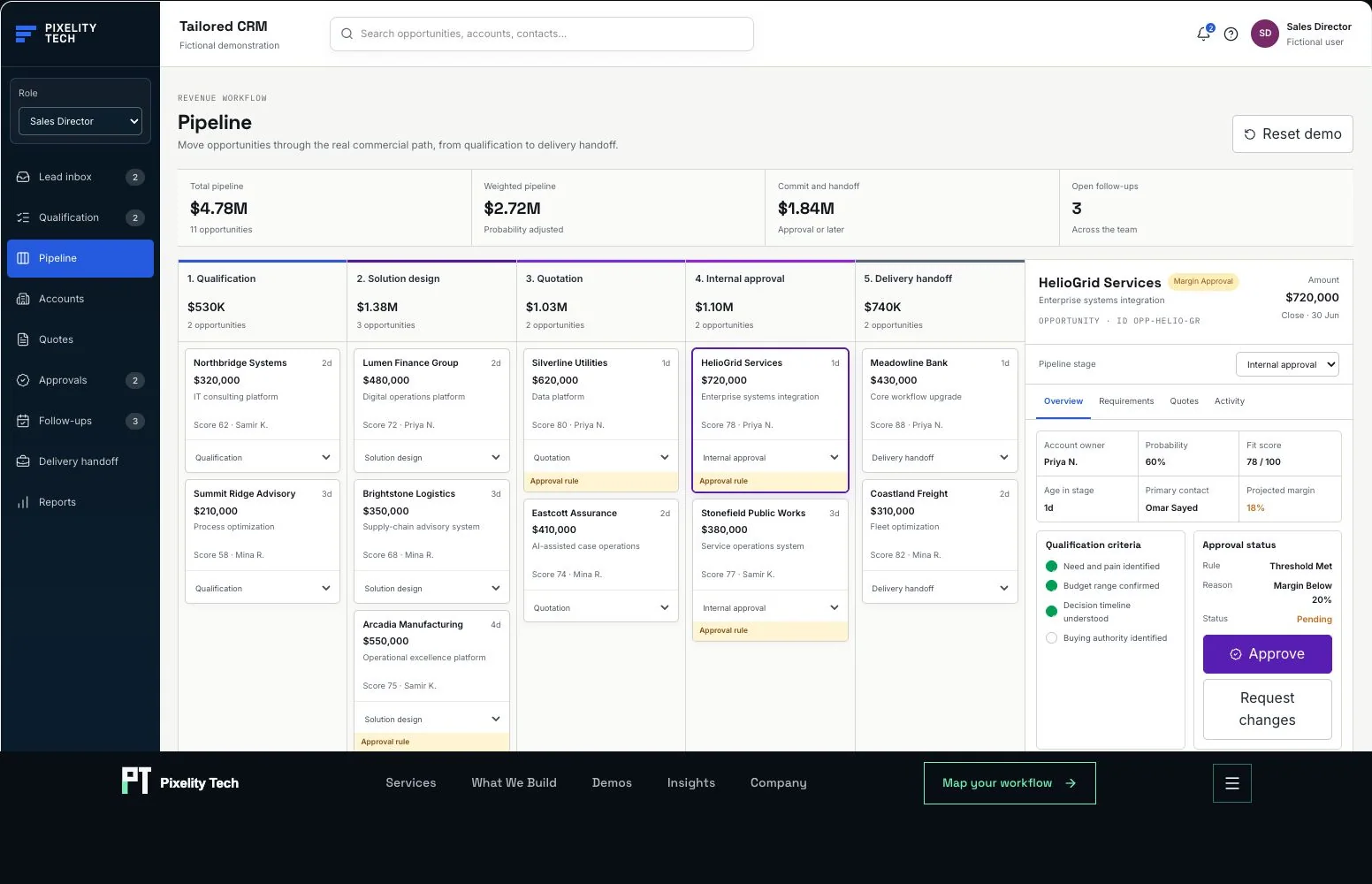
Move opportunities through the real commercial path, from qualification to delivery handoff.
- Total pipeline
- $4.78M
- 11 opportunities
- Weighted pipeline
- $2.72M
- Probability adjusted
- Commit and handoff
- $1.84M
- Approval or later
- Open follow-ups
- 3
- Across the team
1. Qualification
$530K2 opportunities2. Solution design
$1.38M3 opportunities3. Quotation
$1.03M2 opportunities4. Internal approval
$1.10M2 opportunities5. Delivery handoff
$740K2 opportunitiesAll records and organizations in this demonstration are fictional. Actions update local browser state only; no data is transmitted or persisted.
Product views
Screens from the working demonstration
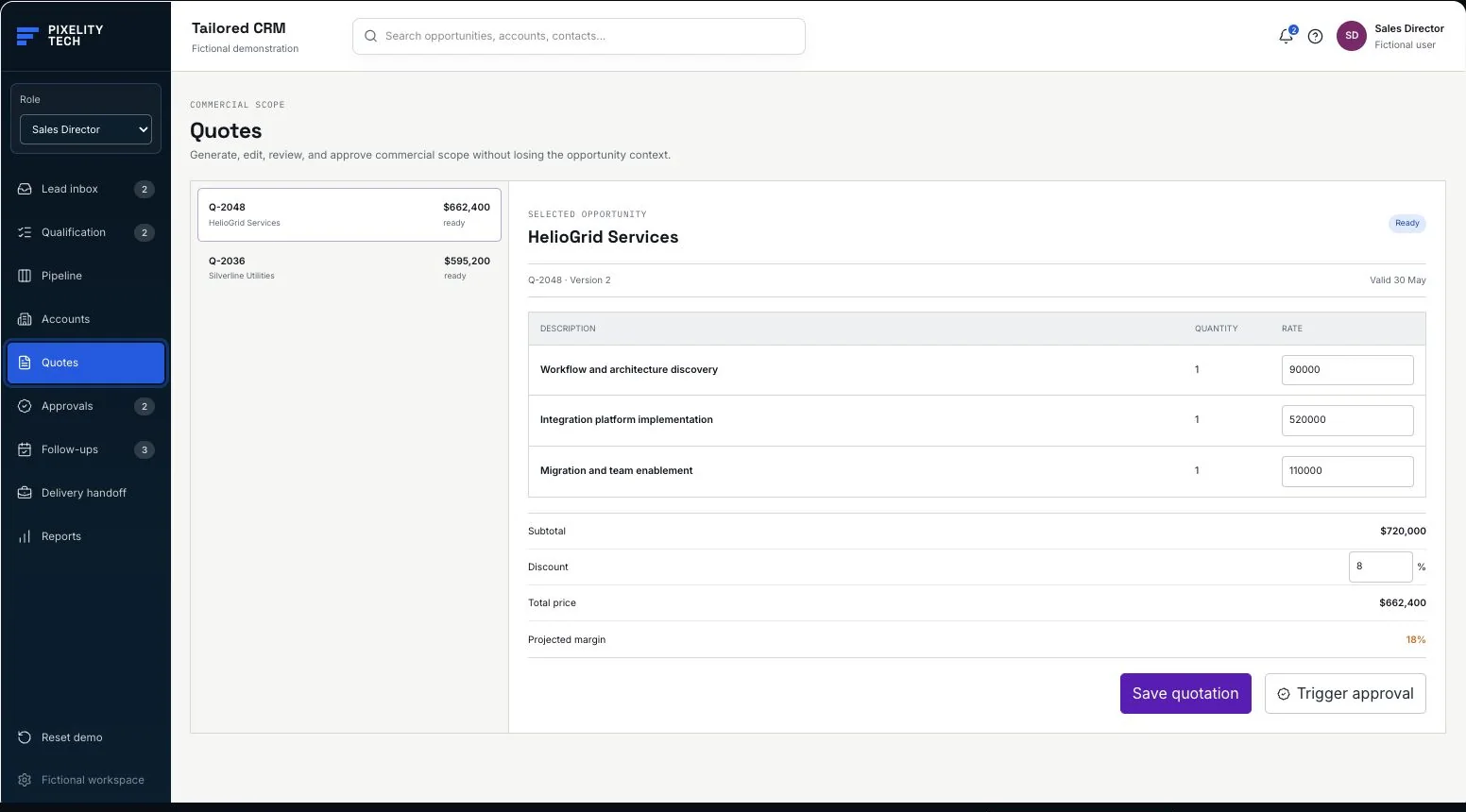
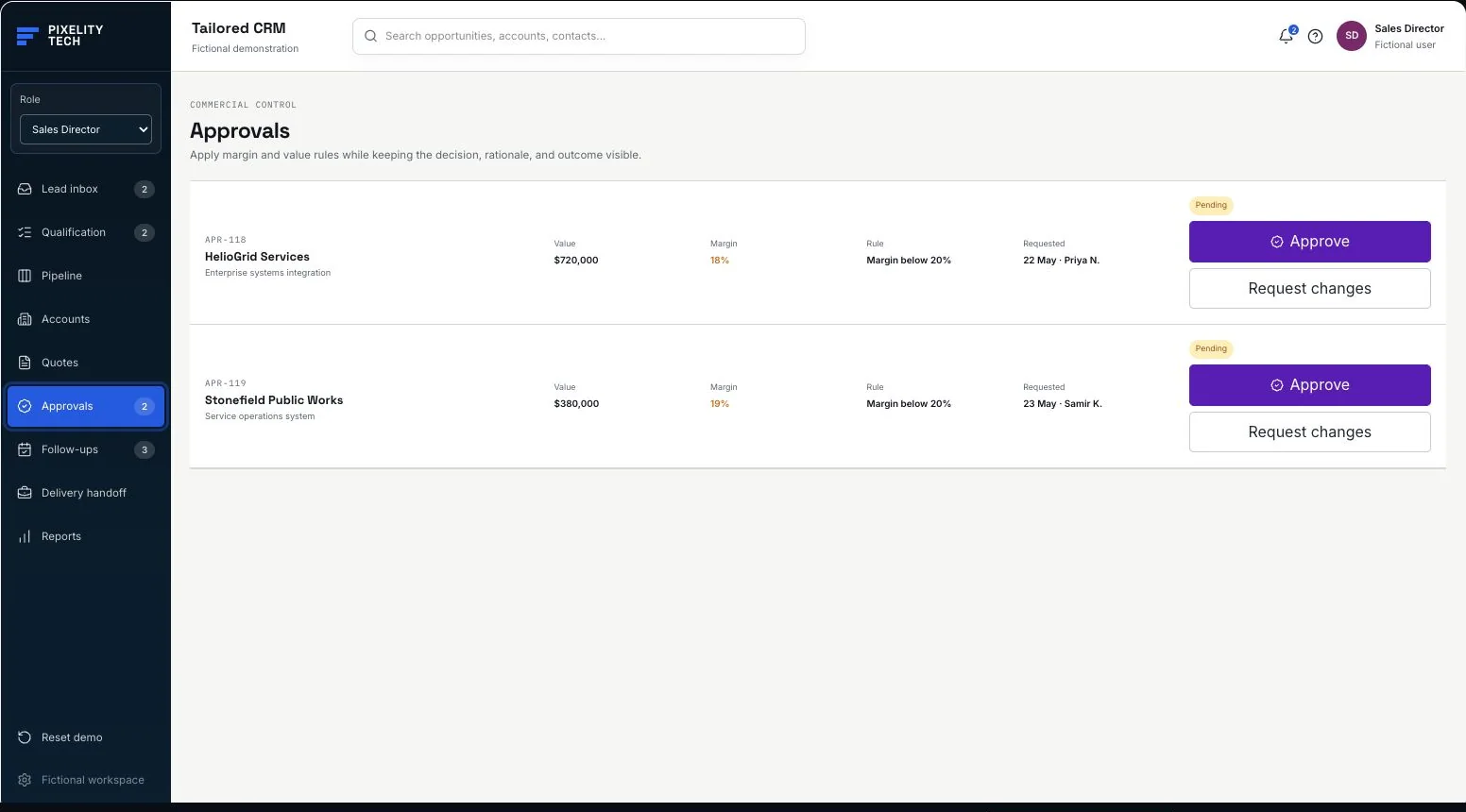
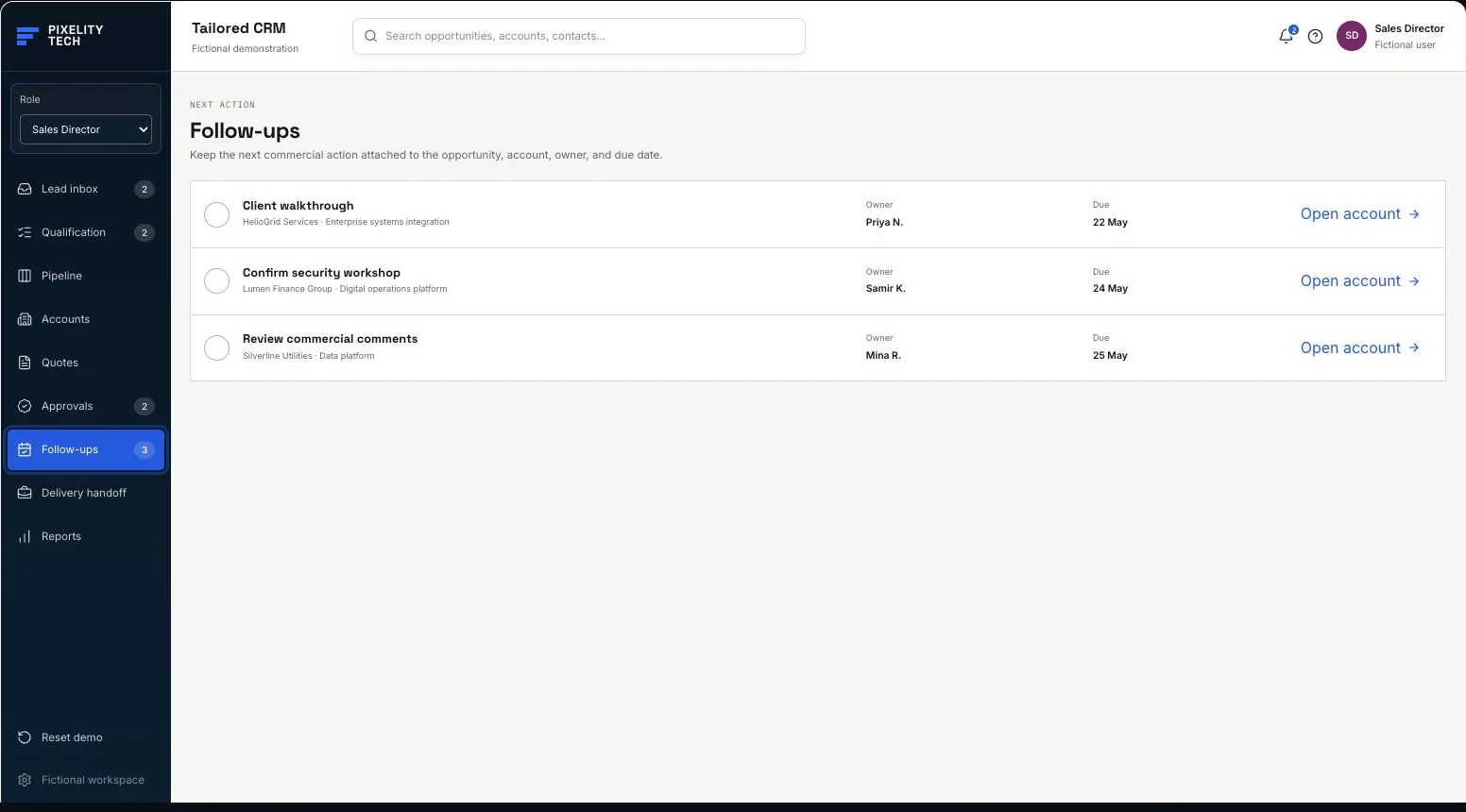
Captured from the interactive application above. Every organization, person, value, and record shown is fictional.
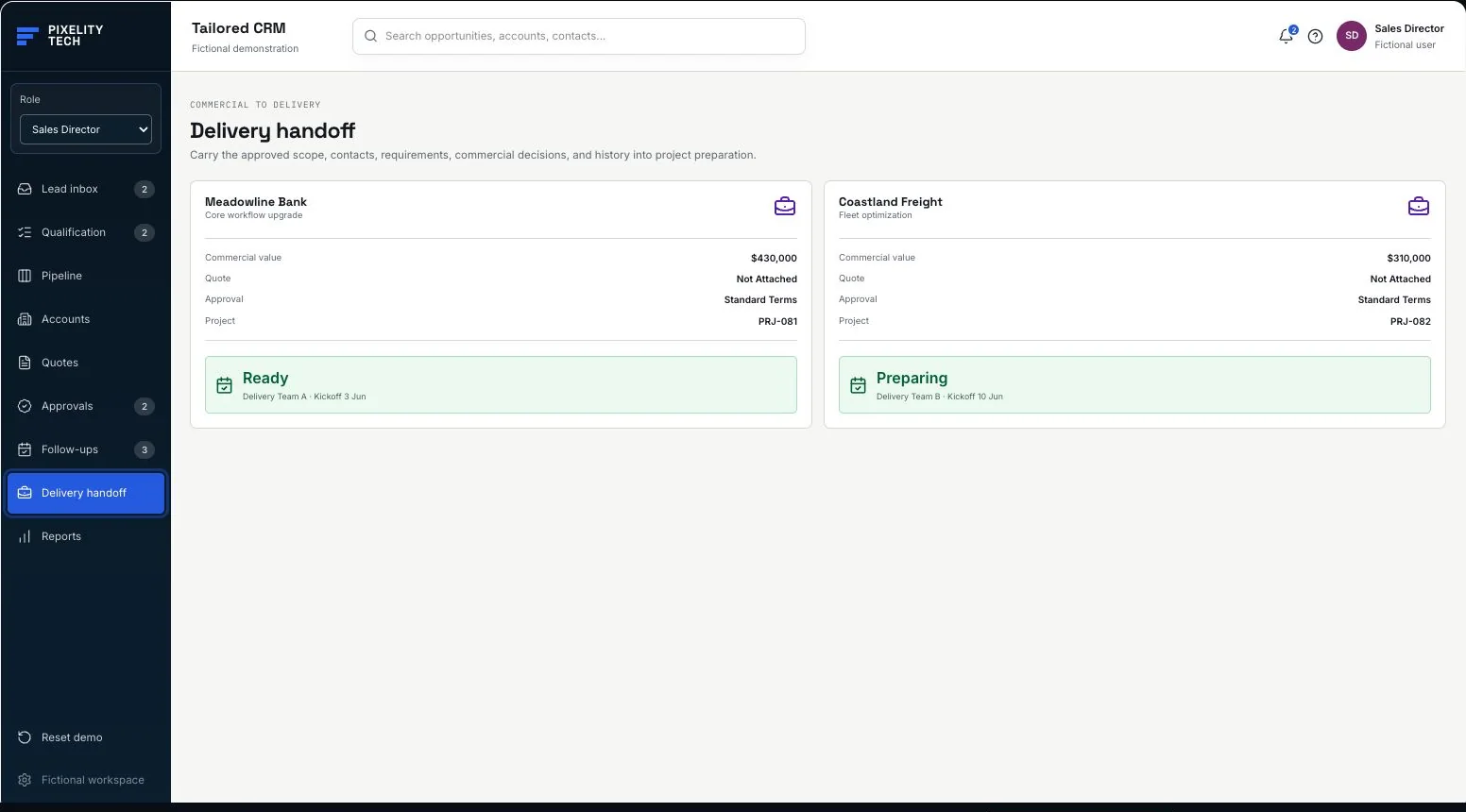
Operational problem
The sale is more complex than a row in a pipeline.
Complex services can require qualification, collaborative solution design, commercial review, repeated follow-up, and a controlled delivery handoff. When those steps live outside the CRM, forecast and account history lose the context behind the number.
Generic stages
A standard pipeline hides the decisions, checks, and exceptions between first interest and a deliverable commitment.
Disconnected commercial work
Quotes, approvals, meeting actions, requirements, and scope decisions are tracked in separate documents and messages.
Weak handoff
Delivery receives a closed deal without the agreed requirements, risks, contacts, or commercial decision history.
Guided walkthrough
Six actions that change the same account record.
The demo state is stored for this browser session. Pipeline, quotation, approval, tasks, project handoff, reports, and history remain in sync until Reset demo is selected.
- 01
Accept a fictional lead
Open Lead inbox and move a new enquiry into the qualification workflow.
- 02
Advance an opportunity
Use the stage selector on any pipeline record; every move updates the record and activity history.
- 03
Generate and edit a quote
Open HelioGrid Services, generate its quotation, change a line rate or discount, and save the new commercial total.
- 04
Apply the approval rule
Trigger approval for a high-value or low-margin quote, then approve it from the opportunity or approval queue.
- 05
Assign the next action
Create a follow-up with an owner and due date, then complete it from the shared task view.
- 06
Create the delivery project
Once the commercial exception is approved, convert the opportunity and inspect the handoff record.
Workflow
One connected commercial path.
- 01Lead
- 02Qualification
- 03Solution
- 04Quotation
- 05Approval
- 06Follow-up
- 07Handoff
- 08Reporting
User roles
Different responsibilities, one commercial record.
A tailored CRM can simplify each role while keeping handoffs and accountability explicit.
Account executive
Qualifies demand, shapes the opportunity, manages relationships, prepares quotes, and owns next actions.
Sales director
Reviews forecast quality, commercial risk, team activity, pipeline movement, and delivery readiness.
Finance reviewer
Evaluates value, discount, margin, and approval exceptions with the quotation and account context visible.
Delivery lead
Receives approved scope, requirements, contacts, commercial history, and handoff actions in one project record.
Rules and exceptions
Policy should appear where the decision is made.
- Opportunities at or above $500,000 require commercial review.
- Projected margin below 20% triggers an approval exception.
- A required approval must be granted before conversion to a delivery project.
- Pipeline, quote, approval, follow-up, and conversion actions are recorded in account history.
- Every stage remains movable with a labeled select control; drag interaction is never required.
Possible customization
Fit the commercial model.
- Pipeline stages and transition rules
- Qualification criteria and scoring
- Quote structure, pricing, discount, and margin policy
- Approval thresholds, reviewers, escalation, and exceptions
- Account roles, permissions, and sensitive-field visibility
- Delivery handoff content and integration targets
Example architecture
Clear product boundaries.
- Role and permission layer for commercial, finance, and delivery views
- Opportunity domain for stages, qualification, contacts, requirements, and forecast state
- Commercial domain for quotes, thresholds, approvals, and version history
- Activity and audit layer recording important user and system actions
- Integration boundary for email, calendar, finance, identity, and delivery systems
Possible integrations
Connect the commercial workflow.
- Email and calendar for captured correspondence, meetings, and follow-up synchronization
- Finance or ERP for pricing references, approved commercial data, invoicing, and account status
- Project delivery tools for scope, contacts, requirements, handoff, and kickoff state
- Identity providers for single sign-on, role mapping, and access controls
- Analytics or warehouse systems for commercial reporting beyond the operational CRM
Build around your sales model
Show us where your CRM stops fitting.
Map the qualification, quoting, approval, follow-up, and delivery steps that matter to your organization. Pixelity can help shape them into one practical system.