Pixelity Tech / Field note
How AI Document Processing Works
AI document processing is a workflow—not a single model call. Follow the path from ingestion and extraction through validation, human review, routing, and audit.
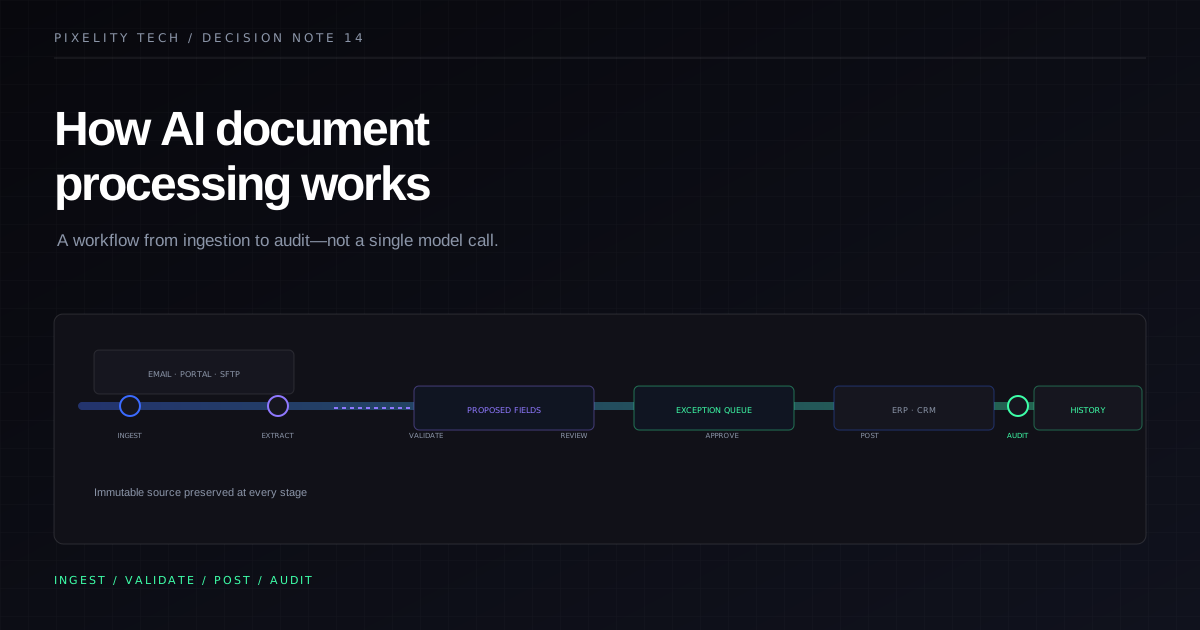
Companies rarely struggle because they lack a model that can read a PDF. They struggle because documents enter through email, portals, and shared folders, get retyped into spreadsheets, reviewed inconsistently, and posted late into systems of record — with no dependable trail when something disputes.
AI document processing addresses that operational path. It is not a single API that returns JSON. It is a workflow: ingest, classify, extract, validate, review, route, post, and audit. Each stage has owners, failure modes, and design choices that determine whether the system is trusted in production.
Understanding the full path helps leaders scope projects realistically, place human review deliberately, and avoid buying “AI extraction” that stops before the work is actually done.
What problem document processing solves
Document-heavy workflows share recurring pain:
- variable layouts from suppliers, customers, or regulators;
- manual re-entry into ERP, CRM, or operations tools;
- bottlenecks when experienced staff are the only people who read documents correctly;
- disputes without side-by-side evidence of what was on the source;
- exceptions scattered across email instead of a governed queue.
AI reduces the reading and typing burden. Software structure reduces the coordination burden. Together they move teams from heroic individuals to repeatable operations.
If the pain is only duplicate entry between two structured systems, integration may come first. If intake is unstructured and high volume, document processing is a strong candidate — after what should a business automate first prioritization confirms volume and ownership.
Stage 1: Ingestion and normalization
Documents arrive through channels: email inboxes, upload portals, SFTP drops, mobile captures, or API feeds from partners.
Ingestion must:
- create a stable record per document with a unique identifier;
- preserve original files immutably;
- capture metadata — sender, received time, channel, related customer or case;
- detect duplicates where the same file resubmits;
- normalize formats where possible — PDF, image, Office — without destroying evidence.
Normalization is not cosmetic. Downstream extraction quality depends on orientation, resolution, and whether multi-page files stay bundled correctly.
At this stage, AI may assist with document type classification — invoice versus credit note versus certificate — but ingestion itself should be deterministic and logged.
Stage 2: Classification and routing intent
Once a document is a record, the system decides what kind of work it is and which process owns it.
Classification can use:
- rules on sender, subject, or portal channel;
- AI on layout and text when channels are mixed;
- human triage for rare types until volumes justify automation.
Routing intent connects the document to operational objects: vendor account, purchase order, project, contract, or support case. Matching identifiers reduces orphan documents sitting in generic queues.
Poor classification is expensive. It sends finance documents to operations queues, or treats statements of work like invoices. Mapping categories to owners is part of where AI belongs in a business workflow.
Stage 3: Extraction
Extraction turns unstructured layout into candidate fields: vendor, dates, line items, totals, tax, identifiers, parties, clauses, or checklist answers.
Approaches include:
- template-aware extraction for repeat suppliers with stable layouts;
- general document models for long-tail variability;
- hybrid templates with model fallback.
Outputs should always be proposals. Even strong extraction commits nothing until validation and authority steps run.
Extraction should attach evidence anchors — where on the page a value came from — so reviewers can verify quickly. A field without locatable evidence is a liability in disputes.
Compare AI extraction with rules-based automation: models interpret; rules enforce.
Stage 4: Validation
Validation is where document processing becomes business software instead of a demo.
Typical checks:
- required fields present for the document type;
- arithmetic consistency on line items and totals;
- vendor or customer exists in approved master data;
- purchase order open and within amount tolerance;
- tax and currency rules;
- duplicate invoice detection on number, date, and amount;
- date within open accounting period.
Failures route to exception queues with explicit reasons — not a generic “error” flag.
Validation is deterministic. It should be readable by operations and auditors. When policy changes, owners update rules with version history.
Stage 5: Human review
Not every document needs equal attention. Review policies combine:
- confidence thresholds from extraction;
- validation outcomes;
- materiality — amount, risk category, new counterparties;
- sampling of auto-processed items.
Reviewers see source evidence, proposed fields, validation results, and permitted actions. They confirm, correct, reject, escalate, or request information.
How human review makes AI systems safer details queue design, SLAs, and audit expectations. Review is not a failure mode. It is how probabilistic steps earn production rights.
The AI document operations demo shows inbox review, review queues, exception registers, and consolidated audit history as connected views on the same records.
Stage 6: Business decisions and approvals
Some documents trigger decisions beyond field correction: approve spend, accept contractual terms, release payment, or acknowledge compliance exceptions.
Decision stages belong in workflow with explicit authority — often the same patterns as approval systems: thresholds, roles, evidence attachments, rejection paths, and timestamps.
AI should prepare decision packets. Humans or explicit rules should authorize outcomes that bind the company.
Skipping this boundary produces “posted by automation” stories that finance or legal cannot defend.
Stage 7: Posting to systems of record
Processed documents should update governed systems through integrations:
- create or match vendor bills in accounting;
- attach files to CRM opportunities or contracts;
- update operational milestones in project tools;
- notify fulfillment or customer teams with structured payloads.
Posting must respect field ownership defined in your operational source of truth. Document processing should not invent parallel customer or vendor identities.
Idempotency matters. Retries must not double-post because a webhook flapped. Conflicts should surface to reconciliation queues with context.
Stage 8: Audit, monitoring, and improvement
Every stage emits history:
- ingestion events;
- model and rule versions;
- extraction proposals and reviewer corrections;
- validation results;
- routing and approval actions;
- integration requests and responses.
Audit trails answer operational and compliance questions without archaeology across email.
Monitoring tracks accuracy proxies: correction rates, validation failure mixes, queue aging, auto-process sampling results, downstream disputes. Spikes trigger incident response — not silent hope.
Improvement loops update templates, rules, and training samples with change control. Document processing systems get better operationally, not magically.
Architecture choices that affect outcomes
Channel consolidation. Multiple inboxes and ad hoc uploads multiply exceptions. A governed intake portal or dedicated operational inbox reduces variance.
Master data quality. Extraction cannot fix vendor lists that are incomplete or duplicated. Data stewardship runs parallel to AI.
Exception ownership. Every queue needs a named owner and escalation when aging exceeds SLA.
Security and retention. Documents may contain PII, financial data, or contractual secrets. Access control, encryption, and retention policies are part of design — not an afterthought.
Provider strategy. Cloud models, private deployment, or hybrid approaches trade cost, latency, and data residency. The workflow architecture should survive provider changes without losing audit history.
AI document processing systems describe this end-to-end scope intentionally — not “OCR feature inside ERP.”
What to measure from week one
Baseline before automation:
- documents received per day or week by category;
- average time from receipt to posting;
- hours spent on reading and re-entry;
- error or dispute rate;
- rework caused by missing evidence.
After launch, measure the same. Leaders should see cycle time and quality move together. Faster processing with rising disputes is a warning sign.
Common failure modes
Extraction without validation. Pretty fields, expensive errors.
Validation without review policy. Blocks everything or approves everything — both destroy trust.
Review without posting integration. Review becomes another manual re-entry step.
Ignoring long-tail layouts. Templates help until they multiply endlessly; plan model fallback and exception paths.
Removing review too early. Confidence improves; risk tolerance should be explicit, not assumed.
Each failure mode is fixable when the workflow is designed as a whole rather than as a model purchase.
How document processing fits a broader roadmap
Many organizations begin with one category — for example AP invoices from top suppliers — then expand to credit notes, delivery receipts, or contract amendments that share vendors and identifiers.
Sequence aligns with other Tech insights:
- confirm intake volume and pain;
- map workflow and owners;
- place AI at extraction and classification;
- enforce validations and review;
- integrate postings;
- expand categories and connected processes.
If policy is still negotiated in email, pause and read when not to automate a process before scaling document automation.
Document processing is operations software
Models read pages. Operations software moves work — with evidence, authority, and history — across teams and systems.
Pixelity’s AI-enabled software service and introduce AI safely use case treat document processing as that operational system: ingestion through audit, with human review and integrations that respect systems of record.
To scope document processing for your intake reality, map your workflow with Pixelity Tech and define the first document category worth processing end to end.
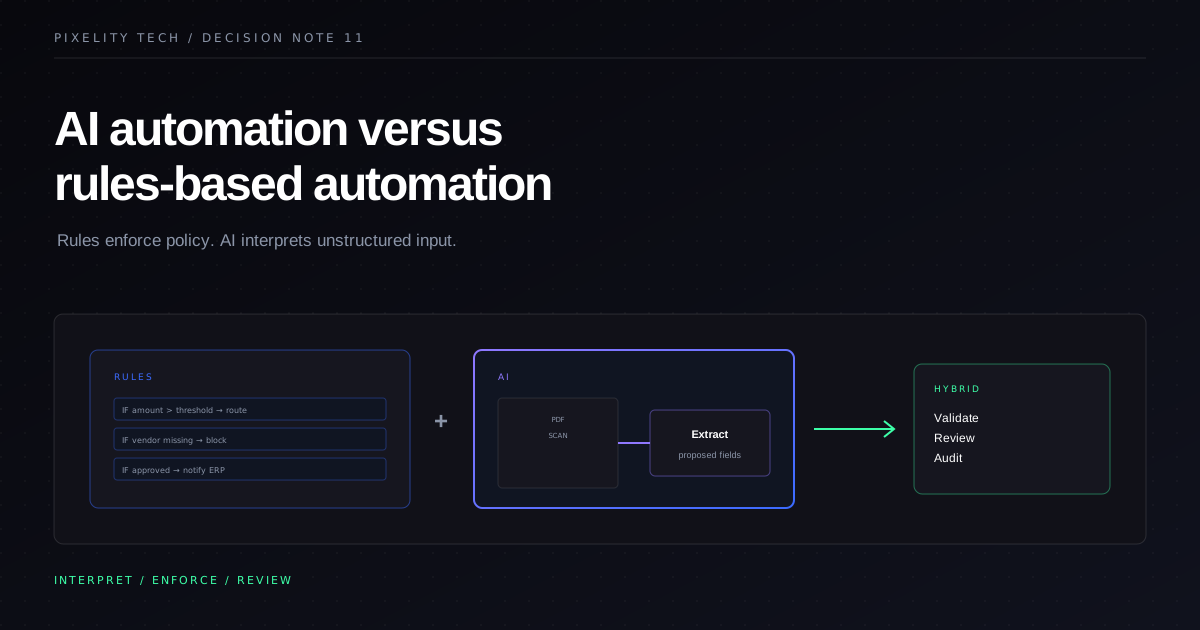
AI Automation Versus Rules-Based Automation
Rules execute policy. AI interprets unstructured input. Learn when each approach fits, how to combine them, and why human review belongs in the architecture.
Read field note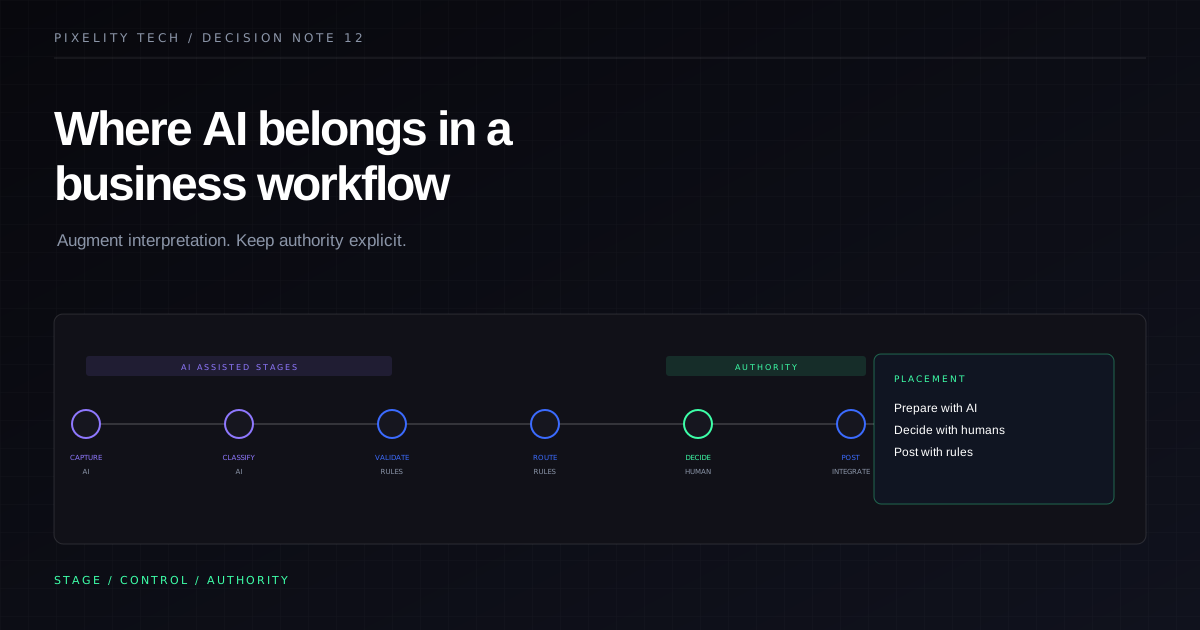
Where AI Belongs in a Business Workflow
AI creates the most value at specific workflow stages—not everywhere. Use this placement model to augment intake, classification, and preparation while keeping authority explicit.
Read field note